


When businesses move beyond spreadsheets and basic bookkeeping, choosing the right accounting software becomes a strategic decision rather than a simple tool selection. I’ve worked with startups, SMEs, and fast-growing companies across manufacturing, services, eCommerce, and consulting, and one question comes up repeatedly: Odoo Accounting vs QuickBooks: which is better for a growing business?
Both platforms are powerful in their own way, but they are designed with very different philosophies. QuickBooks focuses on simplicity and speed for small businesses, while Odoo Accounting is part of a broader ERP ecosystem built for scalability and operational depth.
In this in-depth guide, I’ll break down Odoo Accounting vs QuickBooks from real-world experience, covering features, pricing, scalability, customization, and business suitability so you can confidently choose the right solution for your growth stage.
Table of Contents
Overview of Odoo Accounting
Odoo Accounting is a fully integrated accounting module within the Odoo ERP ecosystem. Unlike standalone accounting tools, Odoo Accounting connects seamlessly with sales, purchase, inventory, CRM, HR, manufacturing, and more.
Key Characteristics of Odoo Accounting
- Built for end-to-end business management
- Modular and highly customizable
- Suitable for SMEs to mid-sized, and enterprise-level organizations
- Available in Community (free) and Enterprise (paid) editions
- Strong support for international accounting and multi-company setups
From my implementation experience, Odoo Accounting shines when businesses want one unified system instead of multiple disconnected tools.
Core Features of Odoo Accounting
- Double-entry accounting
- Automated bank synchronization
- Customer and vendor invoicing
- Multi-currency and multi-company support
- Tax configuration
- Asset management
- Real-time financial reporting
- Tight integration with inventory and operations
Overview of QuickBooks Accounting
QuickBooks, developed by Intuit, is one of the most widely used accounting platforms globally, especially among small businesses. It is known for its ease of use, quick setup, and reliability.
Key Characteristics of QuickBooks
- Designed primarily for small and service-based businesses
- Cloud-first (QuickBooks Online)
- Minimal learning curve
- Strong ecosystem of accountants and third-party apps
- Subscription-based pricing model
In practice, QuickBooks works exceptionally well for businesses that need fast, no-friction accounting without complex workflows.
Core Features of QuickBooks
- Invoicing and expense tracking
- Bank reconciliation
- Basic inventory tracking
- Payroll (region-dependent)
- Tax reports and compliance
- Financial statements (P&L, Balance Sheet, Cash Flow)
Feature-by-Feature Comparison: Odoo Accounting vs QuickBooks
When comparing Odoo Accounting to QuickBooks, examining only surface-level features can be misleading. On paper, both systems handle invoicing, expenses, and reports. In real business operations, however, the depth, flexibility, and integration of these features make a huge difference, especially as companies grow.
Let’s break this down feature by feature, based on real-world usage.
1. Core Accounting & Bookkeeping
Both Odoo Accounting and QuickBooks support double-entry accounting, but their depth and approach differ significantly.
QuickBooks
- Strong core bookkeeping features
- Easy journal entries and adjustments
- Ideal for basic accounting needs
- Limited linkage between accounting and operations
Odoo Accounting
- Fully integrated double-entry accounting
- Journal entries are automatically generated from sales, purchases, inventory, and payroll
- Real-time accounting impact from operational actions
- Eliminates repetitive manual entries
QuickBooks works well when accounting is isolated. Odoo Accounting is superior when accounting must reflect real operational data.
2. Invoicing & Billing Management
Invoicing is a daily activity for most businesses, and automation here saves a lot of time.
QuickBooks
- Simple and fast invoice creation
- Good for service-based billing
- Limited automation for complex pricing or workflows
Odoo Accounting
- Advanced invoicing with automation
- Recurring invoices and subscriptions
- Invoice creation from sales orders
- Custom payment terms and approval workflows
Odoo Accounting is better suited for businesses with structured sales processes.
3. Expense Tracking & Vendor Bills
Expense and purchase handling is where growing businesses often feel the limitations of software.
QuickBooks
- Easy expense categorization
- Upload and attach receipts
- Good for basic vendor bill tracking
Odoo Accounting
- Vendor bills are linked directly to purchase orders
- Three-way matching (PO → Receipt → Bill)
- Approval workflows for finance teams
- Better control over payables
Odoo reduces accounting errors by connecting purchasing and finance.
4. Inventory & Cost Accounting
This is one of the biggest differentiators in the Odoo Accounting vs QuickBooks comparison.
QuickBooks
- Basic inventory tracking
- Limited cost valuation methods
- Not suitable for manufacturing or multi-warehouse operations
Odoo Accounting
- Deep integration with inventory and manufacturing
- Real-time inventory valuation
- FIFO, AVCO, and standard costing
- Landed cost management
If inventory matters to your business, Odoo Accounting clearly outperforms QuickBooks.
5. Tax Management & Compliance
Tax handling becomes critical as transaction volume grows.
QuickBooks
- Pre-configured tax setups
- Automatic tax calculation
- Works well for standard tax structures
Odoo Accounting
- Highly configurable tax rules
- Supports complex tax structures
- Multi-country and multi-company tax handling
- Suitable for businesses operating across regions
Odoo Accounting offers better flexibility for compliance-driven businesses.
6. Financial Reporting & Analytics
Reports are not just for compliance—they drive decisions.
QuickBooks
- Standard reports (P&L, Balance Sheet, Cash Flow)
- Easy to understand for business owners
- Limited customization
Odoo Accounting
- Real-time dynamic reports
- Drill down to the transaction level
- Custom financial reports
- Integration with BI and dashboards
Odoo offers enhanced financial visibility for informed management-level decisions.
7. Multi-Company & Multi-Currency Support
As businesses expand, this feature becomes non-negotiable.
QuickBooks
- Limited multi-company handling
- Manual consolidation required
- Multi-currency is available in higher plans
Odoo Accounting
- Native multi-company support
- Consolidated financial reporting
- Seamless inter-company transactions
- Strong multi-currency management
Odoo Accounting is designed for expansion; QuickBooks is not.
8. Automation & Workflow Control
Automation directly impacts efficiency and accuracy.
QuickBooks
- Basic automation for recurring transactions
- Limited approval workflows
Odoo Accounting
- Fully automated workflows
- Approval rules for invoices and payments
- Scheduled actions and smart reconciliation
- Reduced human intervention
Odoo minimizes manual accounting effort as transaction volume increases.
9. Customization & Extensibility
Every growing business eventually needs customization.
QuickBooks
- Fixed workflows
- Limited customization options
- Heavy reliance on third-party apps
Odoo Accounting
- Fully customizable reports and workflows
- Extendable via custom modules
- Seamless integration with other Odoo apps
Odoo adapts to business processes; QuickBooks expects businesses to adapt to it.
10. User Roles & Access Control
Internal controls are essential for finance teams.
QuickBooks
- Basic user roles
- Limited fine-grained permissions
Odoo Accounting
- Role-based access control
- Department-level permissions
- Strong audit trail and accountability
Odoo provides better governance and control.
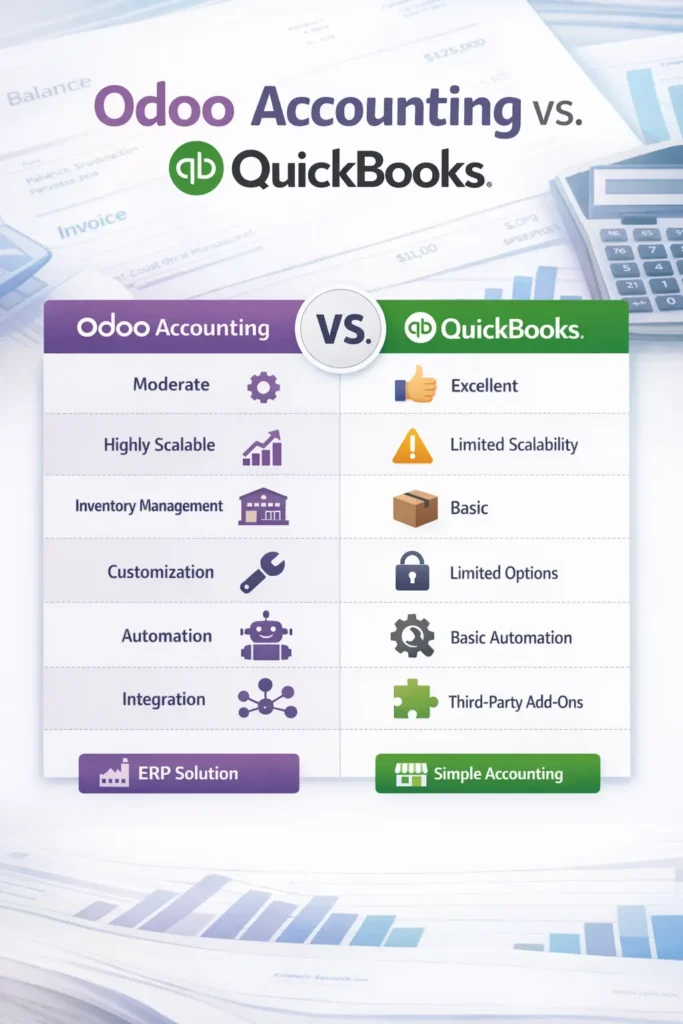
Feature Comparison Summary
| Area | QuickBooks | Odoo Accounting |
|---|---|---|
| Ease of Use | Excellent | Moderate |
| Inventory & Costing | Limited | Advanced |
| Automation | Basic | Strong |
| Scalability | Limited | High |
| Customization | Minimal | Extensive |
| ERP Integration | No | Yes |
In the Odoo Accounting vs QuickBooks comparison, QuickBooks is a great starting point, but Odoo Accounting is a future-proof solution.
If your business is growing beyond basic bookkeeping and needs control, automation, and scalability, Odoo Accounting clearly delivers more long-term value.
Still Confused?? Read this article: How ERP can transform your business and the advantages of ERP.
Final Thoughts: Odoo Accounting vs QuickBooks – Which Should You Choose?
After working with both platforms across multiple industries, my expert recommendation is clear:
- Choose QuickBooks if your business is small, service-oriented, and needs fast, simple accounting.
- Choose Odoo Accounting if your business is growing, operationally complex, or planning long-term scalability.
The Odoo Accounting vs QuickBooks decision ultimately depends on where your business is today and where you want it to be in the next 3 to 5 years.
If accounting is just a requirement, QuickBooks is enough.
If accounting is part of a larger operational strategy, Odoo Accounting is the smarter long-term investment.

